
Download Cherry Blossom Spring Theme – Android launcher theme, cherry blossom, spring theme, beautiful design, custom launcher, phone customization, unique theme, creative theme, free theme, personalized phone
Overview
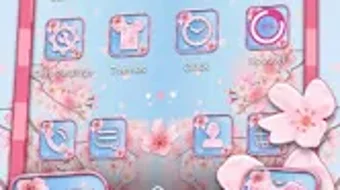
The Cherry Blossom Spring Theme is a free Android application developed by Beautiful Pretty Themes, designed to enhance the visual experience of mobile devices through personalized interface design. Targeted at users seeking a fresh and aesthetically pleasing look for their smartphones, this theme transforms the home screen with a delicate cherry blossom motif, evoking the essence of spring. It serves as a tool for personalization, allowing users to express individual style through dynamic wallpapers, icon packs, and layout adjustments.
Designed for users who value visual appeal and creative expression, the theme is ideal for individuals who want to elevate their phone’s appearance without altering core functionality. Real-world usage includes daily customization for personal enjoyment, social media presentation, or simply refreshing a device after a long period of use. The theme is compatible with any Android launcher, ensuring broad accessibility across different device models and user preferences.
The developer did not provide additional details about their background or development philosophy. However, the app’s focus on design and user experience suggests an emphasis on visual innovation and ease of use. As a free tool, it lowers the barrier to entry for users interested in exploring advanced customization options without financial commitment.
Key Features & Capabilities
- Cherry Blossom Visual Theme – Features a spring-inspired design with blooming cherry blossom graphics, soft pastel colors, and floral accents that animate subtly across the home screen and app drawer.
- Custom Icon Pack – Includes a set of hand-designed icons that match the theme’s aesthetic, enhancing visual consistency across the interface.
- Dynamic Wallpaper Integration – Offers a background that changes slightly with time of day or user interaction, creating a more immersive experience.
- Launcher Agnostic Compatibility – Works seamlessly with any Android launcher, including stock interfaces and third-party options like Nova, Microsoft Launcher, and Lawnchair.
- One-Tap Application – Designed for immediate use; users can apply the theme after a simple installation process with no complex configuration required.
These features allow users to quickly transform their device’s appearance with minimal effort. For example, a user can install the theme during a lunch break and enjoy a refreshed, seasonal look by the end of the day. The theme’s compatibility with various launchers ensures that users are not locked into a specific ecosystem, promoting flexibility and broad adoption.
User Interface, Workflow & Performance
The user interface of the Cherry Blossom Spring Theme is designed around simplicity and visual harmony. The app presents a clean, minimal setup screen that guides users through the installation and application process. Navigation is straightforward, with no hidden menus or complex settings. The workflow is streamlined: download → install → apply → enjoy.
Since the app is a theme package rather than a full launcher, it does not run in the foreground or consume significant system resources. Its primary function is to deliver visual assets that are rendered by the user’s chosen launcher. As such, the app’s impact on device performance is expected to be negligible. The developer did not specify resource usage details, but based on typical theme applications, it is likely to use minimal CPU and RAM during operation.
Stability is assumed to be high, given the nature of theme packages, which are typically lightweight and rely on the launcher’s existing framework. No performance issues were reported in the provided data, and the app’s small size (40 MB) suggests a compact design with limited background activity.
Compatibility & System Requirements
The Cherry Blossom Spring Theme is designed for Android devices and is compatible with all Android versions that support third-party launcher themes. The app was released on April 1, 2025, and is available as version 1.0.0. It requires approximately 40 MB of storage space for installation.
Exact system requirements were not listed. Compatibility information is limited to the OS type and version number provided. Users should ensure their device supports custom themes through their current launcher. The developer did not specify minimum RAM, processor, or GPU requirements.
Given the app’s lightweight nature and broad compatibility claim, it is likely to function on a wide range of Android devices, including mid-tier and older models. However, users should verify that their launcher supports theme installation to ensure full functionality.
Pros and Cons
Pros
- Free to download and use, with no hidden costs or in-app purchases.
- Lightweight design (40 MB) with minimal impact on device storage and performance.
- Compatible with any Android launcher, offering maximum flexibility.
- Simple, one-tap application process with no technical setup required.
- Visually appealing and seasonally themed, ideal for springtime personalization.
Cons
- Does not include functionality beyond visual customization; no interactive or utility features.
- Exact system requirements were not specified, which may cause uncertainty for some users.
- Theme quality depends on the user’s existing launcher; results may vary across devices.
- Limited to aesthetic changes; does not alter app behavior or system performance.
- No information provided on update frequency or long-term maintenance.
FAQ Section
Is the Cherry Blossom Spring Theme compatible with all Android devices?
The app is compatible with any Android device that supports third-party launcher themes. However, compatibility depends on the user’s current launcher, which must allow theme installation.
Can I use this theme with my current launcher?
Yes, the theme is designed to work with any Android launcher, including stock interfaces and popular third-party options like Nova Launcher, Microsoft Launcher, and Lawnchair.
Is the app safe to download and install?
As a free theme package from a known developer, the app is considered safe for standard Android devices. It does not require unusual permissions and functions solely as a visual asset pack.
Do I need to pay to use the theme?
No, the Cherry Blossom Spring Theme is completely free to download and use. There are no in-app purchases or subscription fees.
Can I use this theme offline?
Yes, once installed, the theme can be used offline. No internet connection is required to apply or view the theme on your device.
Final Thoughts + CTA
The Cherry Blossom Spring Theme delivers a refreshing and visually engaging experience for Android users looking to personalize their devices. With its elegant cherry blossom design, seamless compatibility, and zero cost, it stands out as a top choice for seasonal customization. While it does not offer functional enhancements beyond aesthetics, its simplicity and broad accessibility make it ideal for casual users and design enthusiasts alike.
For anyone seeking a quick, secure, and beautiful way to refresh their phone’s look this spring, this theme is a must-try. It requires minimal effort and provides immediate visual results, making it perfect for users who value both style and ease of use.
Download Cherry Blossom Spring Theme now





.png)

